|
|
|
|
|
Free Tune-Up! Use 'Em or Lose Data by Lenny Bailes
Win95 also offers a couple of built-in utilities: ScanDisk and Defragmenter. These two helpful disk-maintenance utilities can mitigate the chore of replacing or reconstructing lost data in the wake of a hard disk disaster.
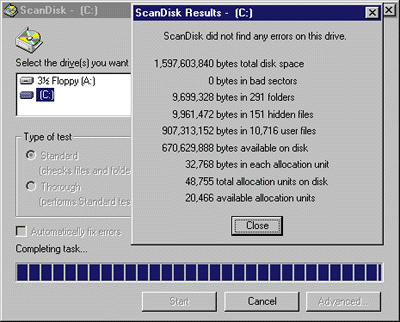
ScanDisk comes in both DOS and Windows 95 flavors. It examines your hard disk and corrects errors caused by wayward programs and quirks in the FAT file structure. Located in the System Tools folder under Accessories, ScanDisk detects errors in the folder/directory table, repairs cross-linked files, reports invalid long filenames and date/time signatures, and detects media defects on the disk surface. ScanDisk can also repair compression errors on Microsoft DriveSpace 2/DriveSpace 3 volumes. Many of the problems that ScanDisk can detect and remedy can adversely affect hard disk performance, too.
If you use DriveSpace 3--available in Microsoft Plus or Windows 95 OEM Service Release 2 (OSR 2)--to compress your system's hard disk, you'll also have an updated version of ScanDisk. The version of ScanDisk included in OSR 2 is also designed to handle Microsoft's new FAT32 file system for large hard drives. If you have the OSR 2 version of Win95, ScanDisk will run automatically at start-up if the machine previously shut down improperly. You can tell if you have Windows 95 OSR 2 installed by right-clicking on My Computer, selecting Properties and checking the version on the General tab; you have OSR 2 installed if the Windows 95 version is 4.00.950B. Microsoft Defrag, the other toothbrush tool for hard disk hygiene, is a disk optimizer. Disk optimizers reorganize the file structure of your hard disk by placing individual pieces of a file into consecutive order on the disk. Normally, when Windows 95 saves files to disk, it searches for available contiguous space. However, due to limitations in the FAT filing system, data sometimes winds up in nonconsecutive locations. When you reopen your files later on, the hard disk heads may have to skip all over the drive--beginning, end and middle--to read all the data into memory. Hip-hopping across the hard disk slows performance and adds mechanical stress to the drive's moving parts. A defragmenter puts files in order to speed up performance and reduce physical wear and tear. Defrag (also in the System Tools folder under Accessories) can perform either a full or partial reordering of the file structure. The default setting will eliminate the holes produced by FAT reshuffling and place all your files next to each other in consecutive order. If you have a large partition and don't want to take the time to do this, you can tell Defrag just to put the pieces of scattered files together and skip consolidating free space. Either choice will help ScanDisk (and other disk recovery utilities) restore your files if you experience a serious hard disk crash. You should run ScanDisk and Defrag once or twice a month; doing so can yield a noticeable difference in your computer's performance. For more serious disk problems, you may need to move up to this duo's big brothers, bundled in Symantec's Norton Utilities. Norton Disk Doctor is likely to do a better job than ScanDisk of fixing serious FAT or directory structure problems and restoring corrupted partition information. The Norton utility also one-ups Defrag with its ability to optimize the Windows swap file, which can put a big hit on performance when it's fragmented. |
|
|