|
|
|
|
|
Free Tune-Up! Dig Up Buried ActiveX Controls by Paul Silverman
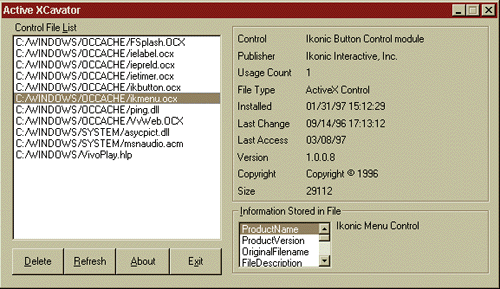
Microsoft Internet Explorer gives you a great deal of help when it comes to automatically downloading and installing ActiveX controls. Click on Yes when IE prompts you to install a detected control, and the browser does the rest. However, IE isn't quite as helpful when it comes to finding and managing all the controls you've installed on your system. If you're a big ActiveX fan, pruning unnecessary files and managing necessary ones could quickly become a daunting task. That's where WinMag's exclusive Active XCavator can help.
If you discover you're housing unneeded or outdated controls that just chew up valuable disk space, XCavator lets you delete them with a mouse click. If you delete one by mistake, simply return to the original source site, and the control will be reinstalled automatically. Download Active XCavator 1.0 free from the WinMag Web site. |
|
|