|
|
|
|
|
Free Tune-Up! Patch Patrol by Lenny Bailes
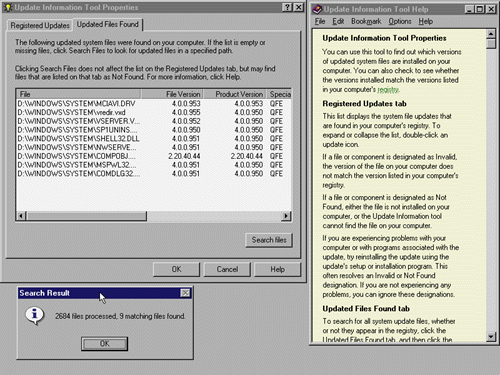
Microsoft's first service update for Win95, issued in January 1996, contained a number of patches and revised dynamic link libraries (DLLs) that fixed minor problems in the operating system. With the service update, Microsoft included Update Information Tool. This program (QFECHECK.EXE), placed in the System Tools folder under Accessories, tracks which of the 10 Win95 update patches are installed on your system. If you've installed some of the patches separately and want to track them, you can also download QFECHECK.EXE from Microsoft's Web site.
Don't Dread the RedIf Update Information Tool reports an invalid driver in red, that doesn't necessarily mean you have a system problem. Sometimes the version number for the active DLL is not updated in the system Registry. You may have a perfectly good file with a later date installed on your hard disk.
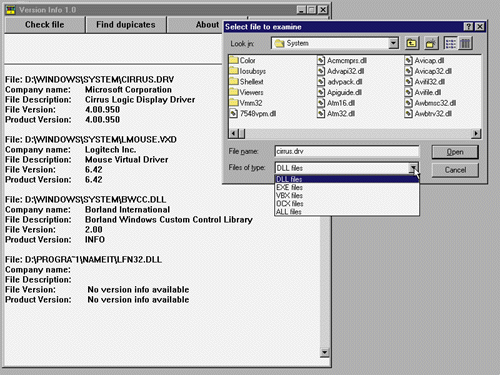
Theoretically, the latest version of each system DLL is backward-compatible with programs that ship with older modules. However, some cranky applications become crash-prone or refuse to run whenever another application substitutes a new system file. A classic example of this is a conflict between Microsoft Office and early versions of Netscape Navigator. After Netscape had been installed, Word and Excel would refuse to run. The only way to fix the problem was to recopy the MS Office versions of system DLLs to the Windows directory or reinstall the entire suite. Duplicate versions of DLLs in multiple directories can also cause system problems. A couple of free utilities might help you solve problems with program GPFs. Version Info 1.0 (http://www.shareware.com) will display the filename and directory path, version number and other pertinent information for any Windows system file (DLL, DRV, EXE, VBX, VXD, OCX and so forth) on your hard disk. It will also track down duplicate versions of these files hidden in other directories. This utility is available in both executable program (EXE) and Windows Control Panel (CPL) formats. Another freebie, Symantec's Norton CrashGuard 1.0 (http://www.symantec.com), protects your file data when programs freeze or conflicting DLLs precipitate GPFs. CrashGuard revives frozen and crashed programs, bringing them back from the twilight zone long enough for you to save your files before closing the sick application. |
|
|